This was discovered from the issue here: microsoft/WSL#2050
The issue is that if I'm using WSL, and execute a command like powershell.exe -command 'Write-output hi' | cat the console font changes to Raster fonts and it resizes the console.
Windows version:
C:\>ver
Microsoft Windows [Version 10.0.17763.292]
Steps to reproduce
- Delete
HKEY_CURRENT_USER\Console to reset console to all default settings
- Run ubuntu console. You should now have these font settings:
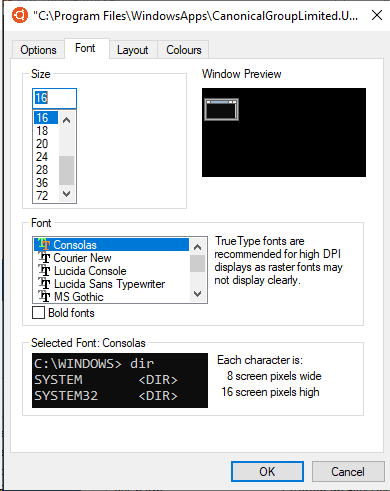
- Execute
powershell.exe -command 'Write-output hi' - no font change, and it correctly echo 'hi' to the command line:

- Execute
powershell.exe -command 'Write-output hi' | cat - font changes to Raster Fonts, and windows resizes to match new font:


Some notes on the behaviour that we discovered in the previous issue:
- Doesn't occur in wsltty
- Doesn't occur if you are using using
Lucida Console as your font.
- Confirmed to also occur on build 18329
Let me know if you need any further debugging or testing.

This was discovered from the issue here: microsoft/WSL#2050
The issue is that if I'm using WSL, and execute a command like
powershell.exe -command 'Write-output hi' | catthe console font changes to Raster fonts and it resizes the console.Windows version:
Steps to reproduce
HKEY_CURRENT_USER\Consoleto reset console to all default settingspowershell.exe -command 'Write-output hi'- no font change, and it correctly echo 'hi' to the command line:powershell.exe -command 'Write-output hi' | cat- font changes to Raster Fonts, and windows resizes to match new font:Some notes on the behaviour that we discovered in the previous issue:
Lucida Consoleas your font.Let me know if you need any further debugging or testing.